Changelogs
Stay up to date with the latest changes and enhancements.
Stay up to date with the latest changes and enhancements.

Stay up to date with the latest changes and enhancements.
14. Aug 2026
Share
Released August 14, 2026
On August 17, Google quietly changes the rules of Smart Bidding. From that date, tCPA and tROAS campaigns are expected to deliver toward the target you set rather than comfortably below it. Every campaign sitting on a loose target, the ones that have been quietly outperforming for months, suddenly has permission to spend up to that number. Costs drift, efficiency slips, and nothing looks broken enough to catch your eye.
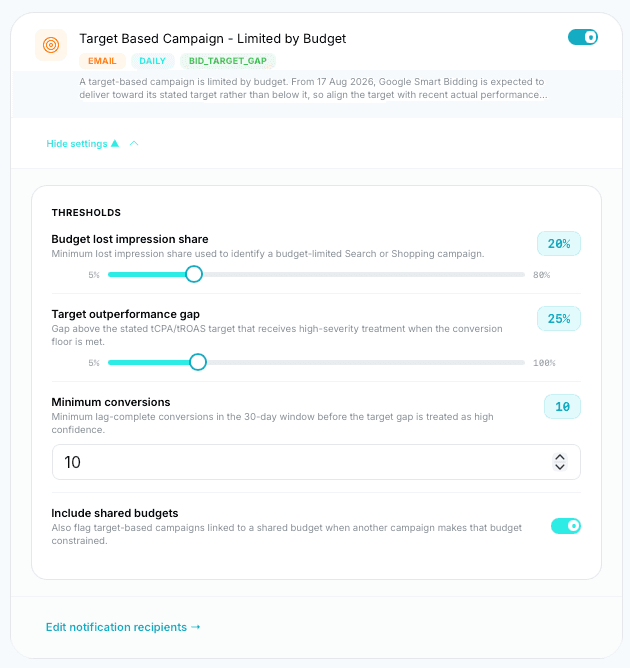
Clicc now catches it before it happens. A new rule identifies the exact campaigns most exposed to the change, so you can tighten targets to match recent actual performance before Google spends the gap for you.
NEW — Target-Based Campaign, Limited by Budget: a daily rule that flags budget-constrained Search and Shopping campaigns currently beating their stated tCPA or tROAS target. These are the campaigns with the most room for costs to rise on August 17, and the fix takes minutes once you know where to look.
NEW — Fully tunable thresholds: set the lost impression share that defines budget-limited, the outperformance gap that earns high-severity treatment, and a minimum conversion floor over the 30-day window so alerts only fire with real confidence.
NEW — Shared budget awareness: optionally flag target-based campaigns linked to a shared budget when another campaign is the one squeezing it.
NEW — Daily email alerts, so exposed campaigns land in your inbox with time to act, not after the spend has moved.
13. Aug 2026
Share
Released August 13, 2026
Clicc on mobile has been rebuilt. Charts previously rendered exactly as they do on desktop — cramped and hard to read on a phone. They're now cards: super clean, easy to read, and designed for smaller screens. This applies platform-wide.
IMPROVED — Charts replaced with card layouts across the entire platform on mobile — the same data, presented in a cleaner, easier-to-read format built for smaller screens.
14. Jul 2026
Share
Released July 14, 2026
A visual refresh across Budget Pacing, Insights, and the Client Dashboard — cleaner styling, properly optimised for smaller screens and laptops. The bigger story is control: pause, enable, and remove campaigns, ad groups, and keywords directly from the Client Dashboard, and edit bidding strategies without leaving Clicc. Plus more powerful Insights filtering and a smoother Campaign Creator image workflow.
NEW — Pause, Enable, and Remove controls for Campaigns, Ad Groups, and Keywords — manage account structure directly from the dashboard.
NEW — Edit bidding options in Campaign Settings, for both tCPA and tROAS, at Standard and Portfolio level.
IMPROVED — Full UI redesign with a more refined, consistent visual style.
IMPROVED — UI redesign with better styling and optimisation for smaller screens.
IMPROVED — Pacing column styling from the Budget page carried through to the Budget Pacing page for a consistent read across both.
NEW — Additional filters in the Insights window — filter by severity and alert type to get to what matters faster.
IMPROVED — UI redesign for a cleaner, easier-to-scan insights view.
IMPROVED — "Go to Google Ads" now deep-links directly into the relevant account — straight to where you need to be.
IMPROVED — Drag-and-drop image upload added earlier in the build flow, replacing the upload button.
FIXED — Ad copy capitalisation — headlines and descriptions now capitalise correctly on campaign creation.
FIXED — Conversion Tracking rule reliability restored — tracking issues are detected and alerted correctly again.
04. Jul 2026
Share
Released July 4, 2026
A heavy quality release. After weeks of real-world campaign builds, we've polished the Campaign Creator end to end — from asset detection through to how campaigns land in Google Ads — so builds push through cleanly, first time. Search Term Optimizer rules gained decimal-level precision on conversion thresholds, and the Client Dashboard now surfaces ROAS where it was missing.
IMPROVED — Campaigns now send to Google Ads with all ad groups, ads, and keywords enabled, with only the campaign itself paused — ready to review and switch on.
IMPROVED — Campaign Focus now starts blank with a "Define your campaign" prompt so every build begins with a clear, deliberate choice.
IMPROVED — Negative keywords can now be dragged in from the suggestion list.
IMPROVED — Clicking Done at the end of a step now moves you straight to the next part of the build.
IMPROVED — Map / geotargeting handling upgraded for more accurate location targeting on new builds.
IMPROVED — Promotional assets detected on your site now appear in the Assets step.
FIXED — Promotion segments now push through to Google Ads correctly.
FIXED — Delete / uncheck behaviour is now consistent across the builder.
FIXED — Products & services now display cleanly in the UI.
FIXED — Brands Carried detection — carried brands are now picked up correctly.
FIXED — Phone numbers in Assets now import as standard phone assets.
FIXED — Symbols in ad copy — prices, ampersands, and more — now carry through intact.
FIXED — Brand keywords now stay out of negative keyword lists.
IMPROVED — Conversion thresholds on rules now accept decimal values — Universal Match Scope (default 0.5) and Auto Add Positive (default 1.5) give you finer control.
FIXED — Rescue Good Terms — slider range now matches the 10-conversion default.
FIXED — Negatives can now be added as EXACT match.
FIXED — "Set all scope to Ad Group / Campaign" on negatives now applies correctly.
IMPROVED — Account View is now the default view on Alert Insights.
FIXED — Campaign Stopped Working rule now correctly recognises brand-new campaigns built in Clicc.
NEW — ROAS now shown in client settings and menus.
IMPROVED — Redesigned Edit Campaign Settings modal.
IMPROVED — Refreshed Budget Intelligence design based on user feedback.
05. Jun 2026
Share
Released June 5, 2026
Budgets stop being guesswork. Budget Intelligence classifies every campaign into a lifecycle stage — data gathering, approaching viability, optimising, performing, scaling, or stalled — and recommends the right move for where that campaign actually is, not where a spreadsheet thinks it should be. Recommendations follow Smart Bidding best practice: conversion-threshold aware, with incremental budget changes instead of destabilising jumps. Alongside it, the Rules Panel gains new always-on monitoring rules so structural problems in an account surface as alerts instead of surprises.
NEW — Lifecycle-stage classification for every campaign — instantly see which campaigns are gathering data, viable, performing, scaling, or stalled.
NEW — Stage-aware budget recommendations, capped to safe incremental changes to protect Smart Bidding stability.
NEW — Conversion-threshold awareness — recommendations respect whether a campaign has the conversion volume to support its bid strategy.
NEW — Campaign Stopped Working rule — alerts when a previously delivering campaign goes quiet.
NEW — Conversion Tracking monitoring — alerts when tracking breaks so you're not optimising blind.
IMPROVED — Rule configuration UI refreshed in the new Rules Panel.
IMPROVED — Clearer daily spend visualisation and projection display.
24. Apr 2026
Share
Released April 24, 2026
Search terms are where Google Ads budgets quietly leak — and where the best growth hides. The new Search Term Optimizer analyses your search term data continuously and turns it into actions: rescuing good terms that deserve their own keywords, adding negatives to cut waste, and keeping match scope tight. Every rule is configurable, and every action is visible before it happens.
NEW — Rescue Good Terms — automatically identifies converting search terms worth promoting to keywords.
NEW — Auto Add Positive rule — converts proven search terms into positive keywords based on conversion thresholds you control.
NEW — Universal Match Scope rule — keeps loose-match traffic under control with configurable conversion thresholds.
NEW — Negative keyword management — add negatives at Ad Group or Campaign scope, individually or in bulk.
NEW — AI relevancy analysis — search terms scored against what your business actually offers, not just performance stats.
NEW — Configurable rule defaults, so the optimizer works the way your agency does.
27. Mar 2026
Share
Released March 27, 2026
The biggest addition to Clicc yet. Campaign Creator builds complete, launch-ready Google Ads Search campaigns from your website. Point it at a URL and it extracts your products and services, brands carried, promotions, and assets, then builds tightly themed ad groups with quality ad copy — no filler headlines, no generic templates. Review everything in the builder, adjust what you want, and push straight to Google Ads.
NEW — Full campaign builds from a URL — products & services, brands, and promotions detected automatically.
NEW — Tightly themed ad group generation with quality-first ad copy.
NEW — Asset extraction and management — sitelinks, callouts, phone numbers, promotions, and images.
NEW — Negative keyword lists generated and editable per build.
NEW — Map-based geotargeting — define exactly where your campaigns show.
NEW — Full review step before anything is sent to Google Ads.
NEW — One-click push to Google Ads.
26. Feb 2026
Share
Released February 26, 2026
This release focuses on improving alert intelligence, tightening access controls, and polishing key user experiences across the platform. Alert management is now more flexible and actionable, while dashboards and emails provide clearer, more reliable information.
IMPROVED — Added a totals row to the Alerts table in Account View for quick performance summaries.
IMPROVED — Replaced the History View actions popover with fast on-hover buttons for Acknowledge and View Details.
IMPROVED — Access control improved — Account Managers and Media Buyers now only see alerts and insights for accounts they are assigned to.
IMPROVED — Improved empty-state messaging when no ad accounts exist, with tailored messages for Media Buyers and Account Managers versus Admins.
IMPROVED — Implemented full expiration validation logic.
IMPROVED — Updated emails to clearly show the expiry date.
IMPROVED — Password reset links now expire after 7 days.
NEW — Alert Filter Configuration — custom post-GAQL filters that control how alerts trigger per alert type.
NEW — Filtering configuration for Alert Disapproval based on Policy Topics.
IMPROVED — Standardised date display and filtering to use the agency timezone across key areas including Account Settings, Alert History, Insights Alerts, and User activity logs.
21. Feb 2026
Share
Released February 21, 2026
This update introduces the Insights & Alerts system, giving you complete visibility into what's happening across your ad accounts without needing to dig through each one manually. Filter alerts by account, date range, or status, then explore the data through interactive charts that break down alerts by type, account, and trends over time. Alerts now flow directly into your email updates with deep links that open the exact alert log you need, and clients can pull up their own filtered alert history from the client dashboard. This release also includes bulk editing for Account Managers and Media Buyers, two new spend columns on Budget Pacing, and a round of UX improvements.
NEW — Filters by Ad Account, Past Logs, Start/End Date, and Acknowledged Status.
NEW — Charts — Alert Type (pie, click for accounts), Alerts by Account (bar, click for counts), Alert Trends (line, daily/weekly).
NEW — Alert tables — History View with Alert Type, Account, Resource, Severity, Acknowledged, Created Date; select to Acknowledge, View, or Export. Account View shows accounts with associated alert types.
IMPROVED — Email updates — "View All Alerts" now links straight to Insights.
IMPROVED — "View History" fullscreen modal filtered by client.
IMPROVED — Alert Logs modal per group alert.
IMPROVED — Bulk-edit Account Managers & Media Buyers.
NEW — Popovers replaced with modals for better laptop positioning.
NEW — Two new spend columns — last 30 days and last 7 days.
FIXED — Budget Pacing page now loads reliably.